Skip to content
EstateSail

EstateSail / Start a business

For liquidators. By liquidators.

How to become an estate liquidator.

You evaluate a house, catalog and price what will sell, run the sale days, take payment, and hand the client a clean report. EstateSail is the system we built for that work, because we do this work too. It saves time from the first house, and it keeps sale days from turning into pricing guns and paper receipts.

The work of an estate liquidator

Families and realtors trust you with a house, its contents, and a deadline. The work runs from the walkthrough to the report you hand the client.

01

Earn the contract

Walk the rooms with the client. Show them a professional system: how you will catalog, price, run sale day, and deliver a clean report. Your own website can show upcoming sales and take a consultation request before that walkthrough. That is how contracts get won.

02

Prepare the sale

Inventory and price what will sell. Print labels that match those prices. Set the rooms so shoppers can move, and so you can tell the client what happened in each part of the house.

03

Run sale days and close

Manage the door, scan at the register, take cash or cards with Square or Stripe, and keep one set of numbers. After the sale, review what sold and deliver the report.

Five stars

When I first started, I didn't know what I was doing or where to begin. The EstateSail app made everything easy.

Amy Hager Family Nest Winter Park Winter Park, FL

How an estate sale works

Every house is different. The workflow does not have to be. A clear process is easier to explain to a client, and easier for a crew to repeat.

01

Walkthrough and agreement

You learn the house, the timeline, and what the family cares about. You leave with a clear scope: what you will sell, how sale days will run, and how they will see the result.

02

Inventory and pricing

Snap a photo. AI writes a description, a category, and a price range. You set the final price. Google Lens and eBay sold listings are there when you want to look closer. The price in inventory is the price at the register and on the report.

03

Labels and the floor

Print a barcoded label from your phone with title, price, and room. Shoppers and helpers then see one number, not a price you have to hunt down later.

04

Sale days, checkout, report

QR check-in at the door. Scan at the register. Take cash or cards with Square or Stripe. Tap to Pay on iPhone is built in with Square and with Stripe. The client report comes from what actually sold.

See the same order in the film: watch the full walkthrough. The written version is on how it works.

Start with a process you can repeat

The software does not replace your judgment. It takes the busywork off the sale so you can explain the process, run sale days, and hand over accurate records.

Explain how the sale will run

Show how inventory, pricing, sale days, and reporting connect. Families and realtors can evaluate a clear process before they sign.

Keep sale-day work connected

Set the price in inventory, print the label, and scan it at checkout. Your register and report use the same item record.

Finish with records ready

Checkout records what sold and how it was paid. You can review the numbers and prepare the client report without reconstructing the sale afterward.

The same system for a first house or a full crew

Solo liquidators and growing teams use the same catalog, labels, checkout, and reports. Pro includes up to 8 people when you are ready to add help.

Inventory and pricing

Snap a photo and AI writes the description, category, and a min/max price range. Google Lens and eBay sold listings are built in when you want to research further.

Labels and checkout

Print barcode labels from your phone, with price and item info. At the register, scan. Take cash, or cards with Square or Stripe. Tap to Pay on iPhone is built in with Square and with Stripe. One person can run one register. Add a second phone when the line needs it.

A report you can hand over

Checkout records revenue, sold items, and how each ticket was paid. Export a PDF or CSV instead of rebuilding the sale from paper receipts. See the full feature set.

Pricing that fits a first sale

Per sale is $99. Pro is $189.99 a month or $1,999 a year. Your first sale is on us, with a 25-minute walkthrough, setup, and training. Compare plans on pricing.

Established crews use the same system across a full sale calendar. Read the overview of estate sale software for professional liquidators.

A professional workflow you can show a client.

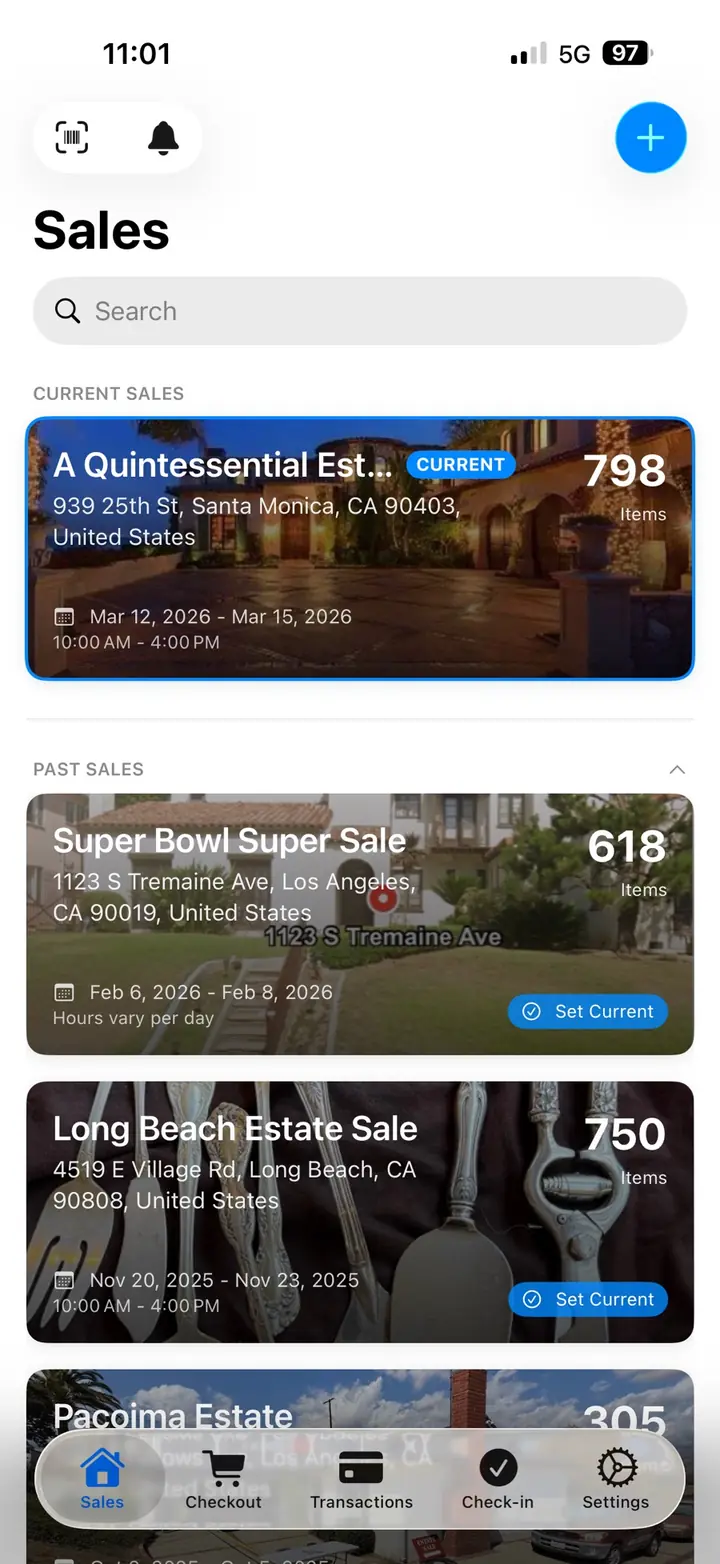
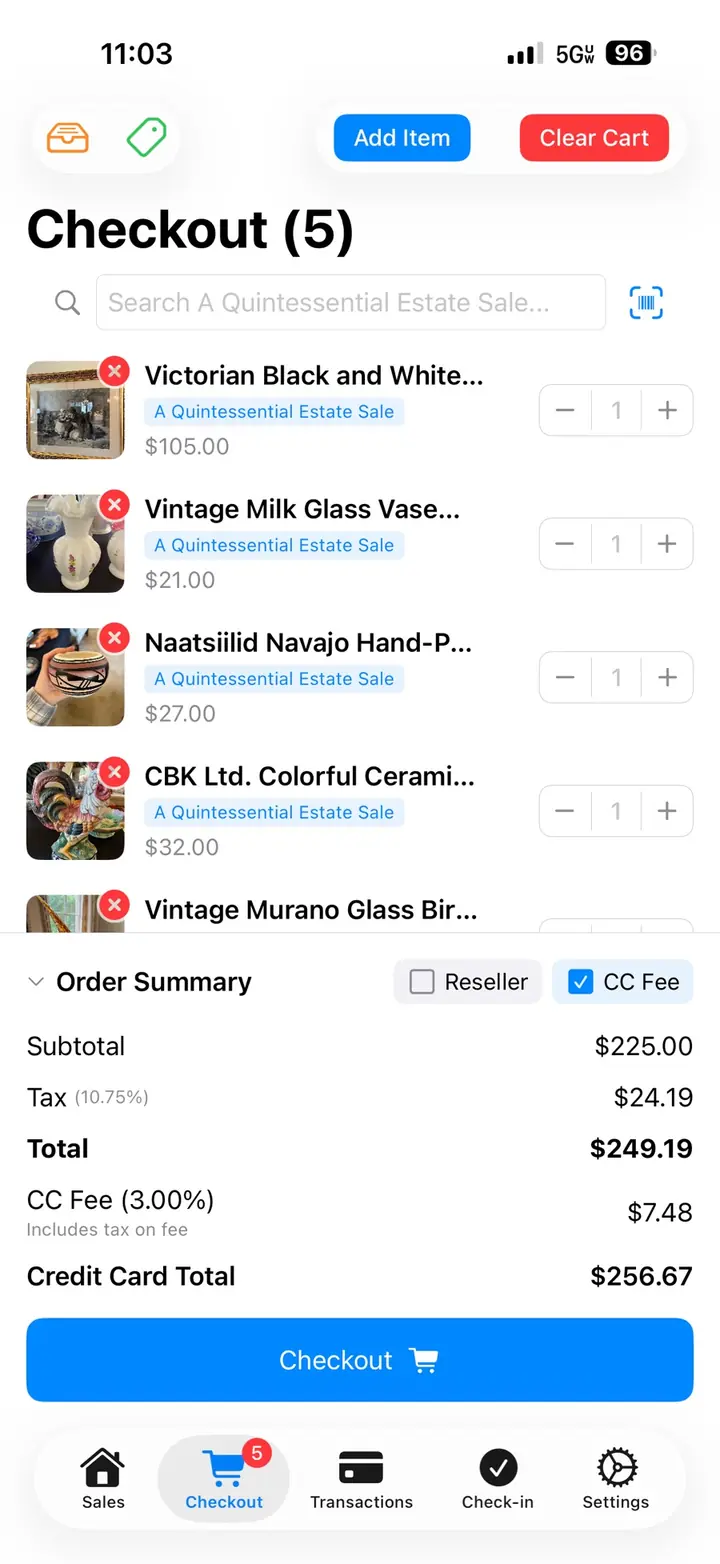
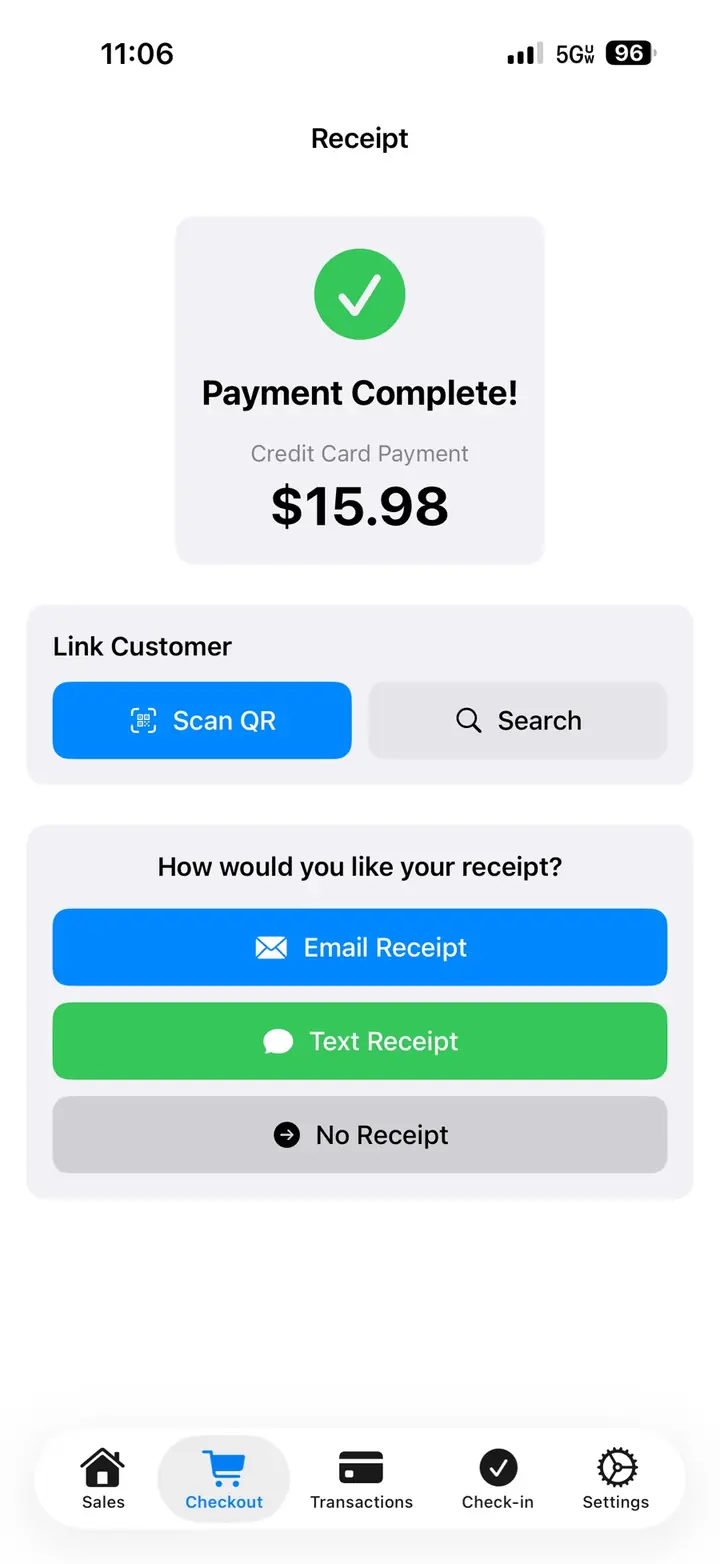
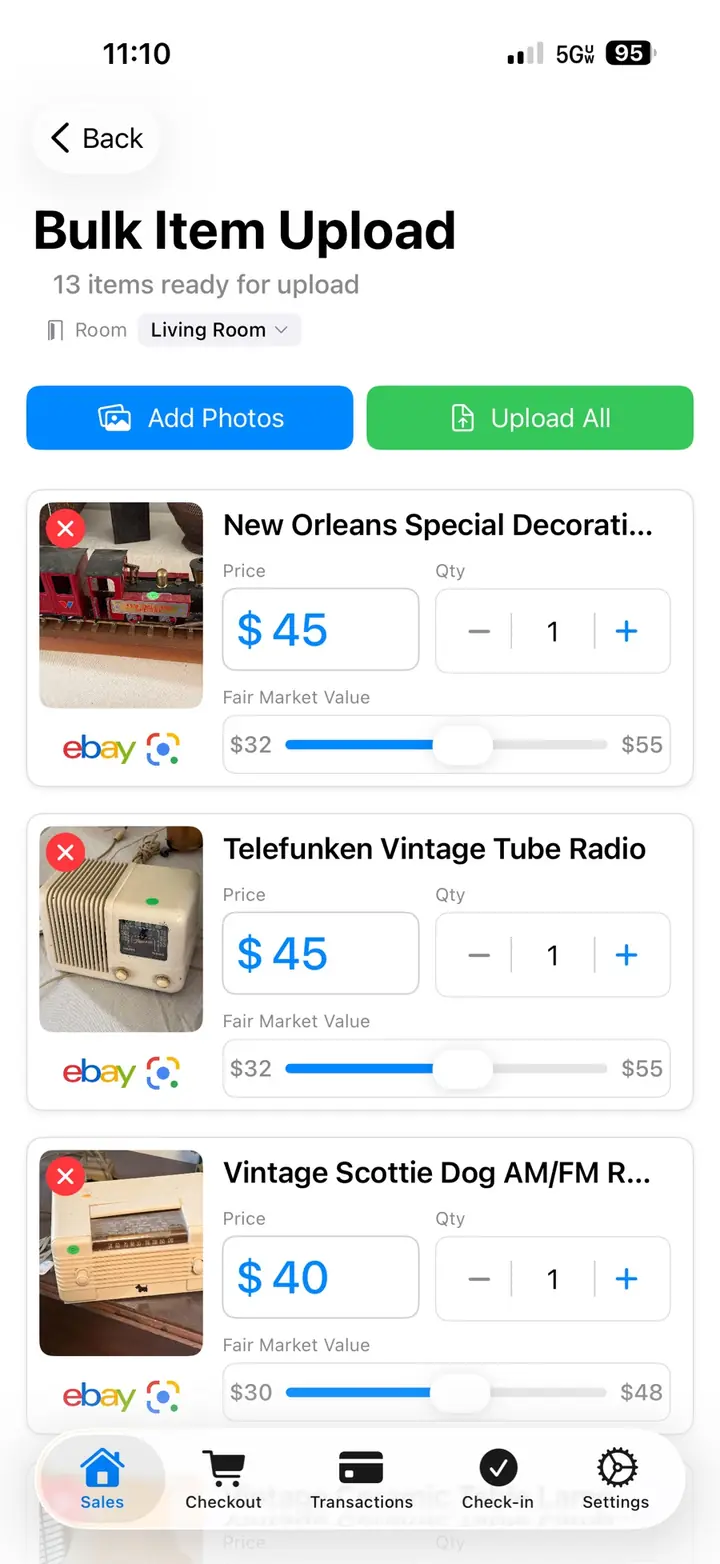
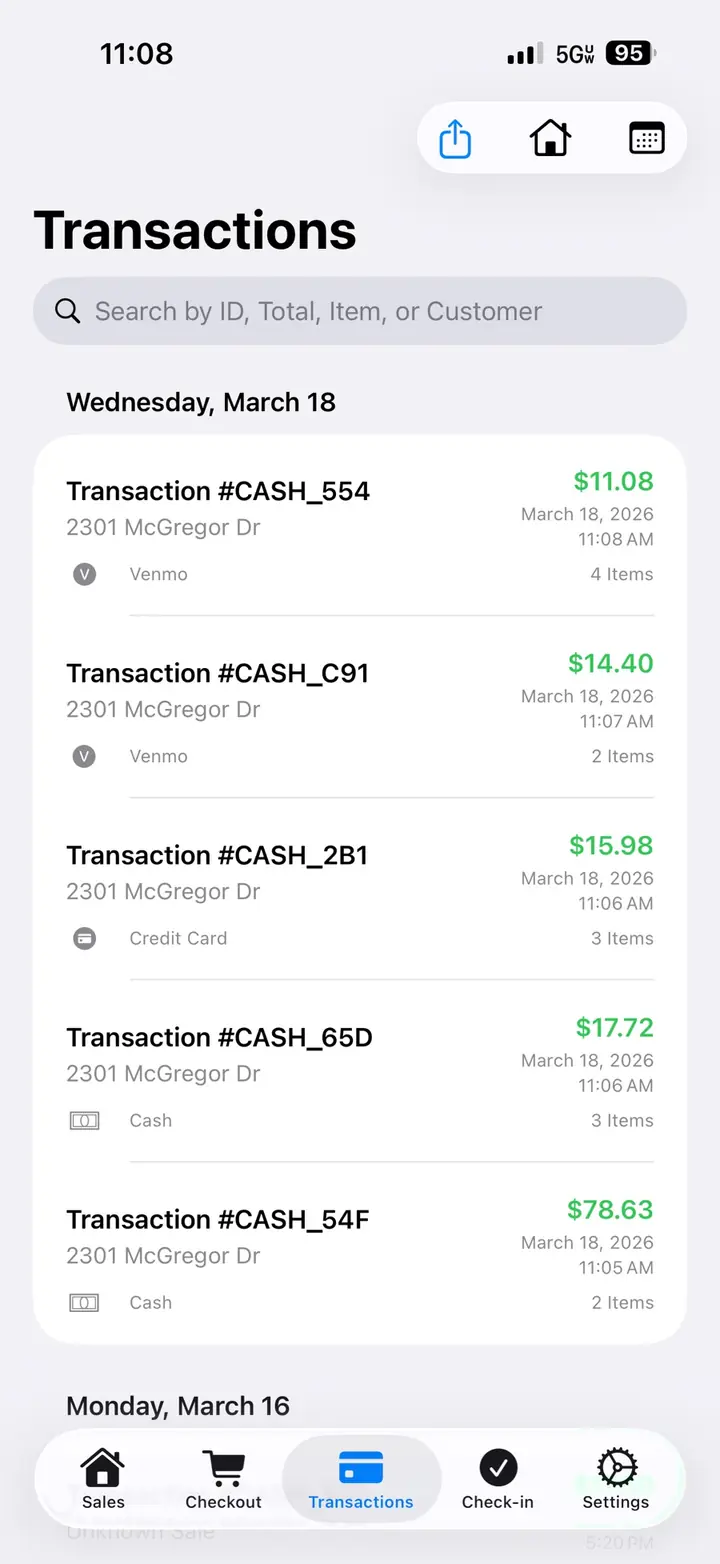
Real EstateSail screens for the sales list, checkout, a receipt, bulk upload, and transactions.

EstateSail sales list on iPhone, with current and past sales
Sales
EstateSail checkout on iPhone, with the cart, tax, and card total
Checkout
EstateSail receipt on iPhone after a credit card payment
Receipt
EstateSail bulk item upload on iPhone, with prices and quantities ready to add
Bulk upload
EstateSail transactions list on iPhone, with payment method and item counts
Transactions

A practical way to start

01

Watch the walkthrough

See inventory, pricing, labels, sale day checkout, and the report in one sitting. No meeting required.

Watch the full walkthrough
02

Download the app today

Cataloging, labels, check-in, and checkout happen on the iPhone or iPad you already carry through the house.

Download the app today
03

Set up the next house

Create the sale, add rooms, begin inventory, and train on the same workflow your crew will use on sale days. Connect Square or Stripe when you are ready to take cards. Tap to Pay on iPhone is built in with Square and with Stripe.

Want a live walkthrough of your next house? Book a demo. It is 25 minutes, with account setup and training. Your first sale is on us.

Questions before the first contract

What does an estate liquidator do?

An estate liquidator sells the contents of a home for a family or an estate. You walk the house, agree on the work, inventory and price what will sell, prepare sale days, take payment, and deliver a report of what sold.

How does an estate sale work?

The usual path is a walkthrough, an agreement, inventory and pricing, labels, then one or more sale days with checkout, and a report after. Shoppers come through the house. You track what sold and what the client is owed.

Do I need estate sale software before my first sale?

Software is useful before the first sale when it helps you establish a repeatable process. Inventory, pricing, labels, checkout, and reporting stay connected while you focus on the decisions that require your judgment.

How does EstateSail help a new liquidator win contracts?

EstateSail helps you explain how the sale will run and show the records behind it: inventory, pricing, labels, checkout with Square or Stripe, and a client report.

What does EstateSail cost to start?

Per sale is $99. Pro is $189.99 a month or $1,999 a year, with up to 8 people on Pro. Your first sale is on us when you book a demo, with account setup and training. See pricing.

What equipment do I need besides the software?

An iPhone or iPad, a way to print labels from your phone, and a way to take cards. Connect Square or Stripe for checkout. Tap to Pay on iPhone is built in with Square and with Stripe. A basic scanner helps once you are printing barcodes.

Can one person run an estate sale with EstateSail?

Yes. Solo liquidators use the same inventory, labels, and checkout as a crew. When you add help, each person gets their own login. Pro includes up to 8 people.


Ready to see it in action?

Get a free 25-minute walkthrough, and your first sale is on us. Personalized account setup and complete training are included. Try it on your next sale.