

A smooth estate sale day starts before the doors open: inventory labeled, check-in ready, registers staffed, and a settlement plan so you’re not reconciling at midnight. This estate sale day checklist is built for professional liquidators (not garage-sale hobbyists) so your crew spends hours on the floor, not on pricing guns, paper tickets, and spreadsheet cleanup.
Use it as a run-of-show. Steal the parts that fit your company; ignore the rest.

Night-before / morning-of prep
Sale day is won in prep. If the inventory is half-baked at 7 a.m., the door will feel it.
Checklist:
- Confirm the sale + rooms: Living room, garage, upstairs, consigners. Everyone on the crew should know the map.
- Money items labeled: Pros don’t barcode every sock. Label the pieces that matter (roughly everything above a few dollars) and lot the rest. A compact Bluetooth printer like a NIIMBOT B1 (~$30; scanners similarly cheap) keeps barcoding fast. Must be the B1, not a B21. Wrong model, wrong sale.
- Prices overridden where it counts: If you used AI suggestions earlier in the week, spot-check antiques, signed pieces, and “the family will ask” items. Suggestions help; you still decide.
- Hardware charged and paired: Phones/tablets, label printer, scanners. Test one scan → one cart add before buyers arrive.
- Registers assigned: Who’s on door, who’s on floor, who’s on checkout. Multi-register isn’t optional on a busy sale day.
- Cash float + card path: Float counted. Square and Tap to Pay logged in on each register device.
- Pause online inventory during floor hours (EstateSail hybrid): This is a product control, not just a sticky-note process. Pause online inventory while the in-person sale is live so you don’t double-sell the same piece; pickup windows can still work for leftovers.
Steady control starts with “we already did the hard part.”
Door open: check-in without the yelling
Early birds are a feature of this industry. Chaos at the door is optional.
Checklist:
- One check-in point with QR: EstateSail check-in (QR + queue) gives you one crew member owning the line and a clear who’s-in-house view. Everyone else stays off the porch arguing about numbers.
- Know who’s in the house: Gated homes, HOAs, and security-conscious families care. Check-in isn’t theater; it’s accountability, and the queue shows it.
- Appointment / staged entry when needed: Some properties can’t take a free-for-all. Run the queue you promised the client, not the one the loudest buyer demands.
- Floor rules posted once: Bags, bathrooms, no early “holds” in the master closet. Say it once; enforce it kindly.
When check-in is clean, checkout gets easier, because you’re not hunting mystery shoppers at close.
On the floor: keep inventory honest
The inventory you built is the source of truth. Sale day is when it either holds or falls apart.
Checklist:
- Scan or look up; don’t rewrite prices by hand: Handwritten overrides at the table become register fights.
- Flag solds / holds in-system: Sticky notes on furniture vanish. A parked cart or hold in the app doesn’t.
- Lot low-value piles early: Clothing tables and kitchen junk drawers eat time. Bundle, price the lot, move on.
- Photo anything weird that walks: Broken lamp that was fine at open? Document before the settlement conversation.
You’re not running a museum. You’re running a house. Speed with a paper trail beats perfection theater.
Checkout: multi-register reality
This is where paper tickets and “one laptop at the kitchen table” die.
Checklist:
- Two (or more) registers when volume warrants: iPhones or iPads ringing carts in parallel. Estate sale POS means multi-register checkout, not a single bottleneck.
- Scan barcode labels: That’s why you printed them. Scan → price → bag. Fewer “what did we price this?” moments.
- Cash and cards both ready: Cash still happens. Cards via Square and Tap to Pay on iPhone keep lines moving without a separate terminal parade.
- Discounts / tax / receipts in one flow: Don’t invent a side spreadsheet for “10% off for the neighbor.” Put it in the cart.
- Parked carts for “I’ll be right back”: Buyers leave to grab a spouse or a trailer. Park the cart; don’t rebuild it from memory.
Slow lines create pricing fights. Fast lines create reviews and return buyers for your next sale, not just this estate’s leftovers.
Close of day: settlements and team clock
The family (and your franchise office) remember how you closed more than how you opened.
Checklist:
- Final walk with the client or lead: What sold, what’s left, what’s going to donation/haul. No surprises in the packet.
- Same-day itemized client packet (ideal): Itemized solds, fees, deductions before you leave the house. Professional settlements win the next walkthrough. Queued / email the next business day is only a backup when the data is already clean, not a plan to reconstruct the sale from memory.
- Team clock closed: Who worked, how long, any overtime notes. Labor shouldn’t live in a group text forever.
- Cash reconcile once: Float in, sales out, variance noted. One reconcile beats three “wait, where’s the other envelope?” rounds.
- Hardware packed / leftover inventory plan: Labels, printers, scanners. Decide haul vs. hold vs. online leftover before everyone is exhausted.
Home before the spreadsheet apology tour. That’s the bar.
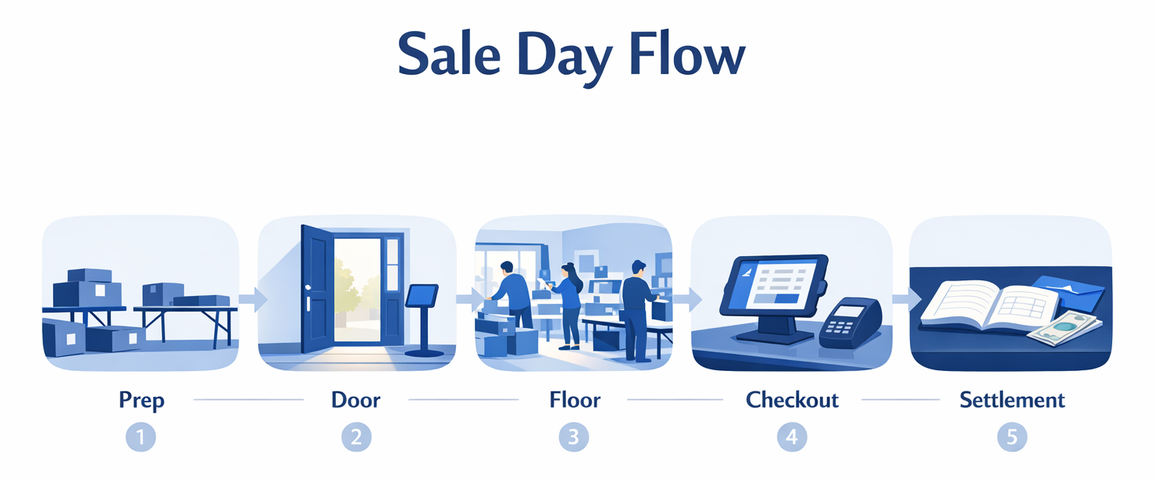
Quick “day-of” one-pager (print this)
| Phase | Must-haves |
|---|---|
| Prep | Rooms confirmed · money items labeled (B1) · registers + card path live · pause online inventory (EstateSail hybrid) |
| Door | QR check-in owner · who’s-in-house queue · rules posted |
| Floor | Scan don’t rewrite · holds in-system · lots for junk drawers |
| Checkout | Multi-register · Square / Tap to Pay · parked carts · receipts |
| Close | Same-day settlement packet · Team clock · one cash reconcile · leftover plan |
Tape it to the register stand. Your sale-day self will thank your pre-sale self.
FAQ
What should be on an estate sale day checklist?
Prep (labels, hardware, registers), door check-in, floor inventory discipline, multi-register checkout, and close-out with settlements plus labor. If a step doesn’t reduce chaos or protect the client packet, cut it.
Do I need barcode labels on every item?
No. Label the money items; lot the rest. Barcodes shine at checkout speed, not as a mandate to tag every hanger. A NIIMBOT B1-class printer is enough for most crews.
How many checkout registers do I need?
Enough that the line never becomes the product. Busy sale-day houses often need two or more devices (iPhone/iPad) running the same inventory: cash on one, cards on another, or both mixed. Single-register “kitchen table POS” is how you invent late-night spreadsheet sessions after the sale.
When should I prepare the client settlement?
Build toward it on every sale day: accurate solds, fees, and leftovers. Prefer a same-day itemized client packet. Queued / email the next business day is fine only as backup when the data is already clean, not as the default “we’ll figure it out later.”
Where does team clock fit on sale day?
Clock people in/out like any field crew. Sale-day labor belongs next to the sale record, not in a lost Notes app. It makes payroll and client billing cleaner, and arguments shorter.
Soft next step
If your current “system” is a pricing gun, a door clipboard, and a reconciliation that eats the night after the sale, you’re doing the hard part twice. EstateSail is built for liquidators who want smoother sale days: inventory and labels before open, QR check-in at the door, multi-register Square / Tap to Pay checkout, hybrid pause during floor hours, same-day settlements, and Team clock at close.
Your first sale is free. Run the next house on a real flow, get the hours back, and feel what steady control actually means. After that, most crews don’t go back.
New to the category? Start with what is estate sale software. When you’re ready to see the product or budget the sale, skim features and pricing on learn.estatesail.us.