

Estate sale software vs spreadsheet isn’t a morality play. It’s a fit question. Spreadsheets track lists; estate sale software runs the sale: inventory, barcode labels, check-in, multi-register checkout, and client settlements in one trail. If your crew still prices with guns and closes with Excel at midnight, the sheet isn’t “wrong.” The job outgrew it.
This is category education for professional liquidators, not a roast of Excel, Google Sheets, or the honest workbook that got you through your first houses.

What a spreadsheet is actually good at
Give credit where it’s due. A well-loved estate sale spreadsheet still wins at:
- Tiny / solo sales: One register, one trusted helper, a short inventory
- Office math: Fee splits, rough budgets, “what did last month look like?”
- One-off exports: A family wants a CSV; you already live in rows
- Thinking on paper (digital): Brainstorming room maps before the inventory exists
Spreadsheets are excellent lists. They’re weak operating systems.
Where spreadsheets break on a real liquidation sale
Professional sales aren’t a garage-sale table. They’re multi-room houses, early birds, card buyers, and families who want a clean packet. That’s where estate sale software vs spreadsheet stops being theoretical.
Multi-register checkout
Two or three phones ringing carts at once. A spreadsheet doesn’t scan a barcode into a cart. Someone retypes a price, squints at a sticky note, or yells across the kitchen. Every retype is a line delay, and a chance for the wrong number.
Price truth mid-sale
Change the mid-century dresser after open. In a sheet, you hope every helper saw the update. In software, inventory is the source of truth: update once, reprint the label that matters, scan the same SKU everywhere. Fewer pricing fights.
Door control
Clipboard check-in and a Sharpie “work” until the porch turns into a free-for-all. Spreadsheets don’t do QR queues, who’s-in-house, or gated appointments. Door chaos leaks into stolen items, angry buyers, and a crew that starts the day already behind.
Settlements that win the next house
Families and franchise offices want itemized solds, fees, and deductions, not “I’ll send numbers tomorrow.” Rebuilding a settlement from receipts and memory is unpaid accounting. Software that already knows what scanned and sold can produce a client-ready packet while you’re still packing the van.
Team labor
Hours per sale matter for payroll and for bidding the next walkthrough. A separate timesheet spreadsheet is one more tab to reconcile. A team clock tied to the sale keeps labor next to the money.
If that list feels familiar, you’re not bad at Excel. You’re running a company through a tool built for tables.
Side-by-side: spreadsheet vs estate sale software
| Job | Spreadsheet | Estate sale software |
|---|---|---|
| Build a room list | Excellent | Excellent (rooms + photos) |
| Suggest / override prices | Manual | AI suggest → you override |
| Barcode labels (e.g. NIIMBOT B1) | Separate / none | Print from inventory |
| Multi-register scan checkout | Weak: retype | Strong: scan into cart |
| Check-in / queue | Clipboard theater | QR + who’s-in-house |
| Square / Tap to Pay trail | Separate POS + export pain | Checkout tied to inventory |
| Same-day client settlement | Rebuild from receipts | Itemized from solds |
| Team hours on the sale | Another tab | Clock next to the sale |
| Best fit | Tiny / solo / learning | Crews running sales week after week |
Neither path requires barcoding every sock. Pros label the money items and lot the junk drawers. The question is whether price, scan, and settlement share one brain, or three apps and a midnight merge.
A concrete sale both ways
Spreadsheet sale (you know this one): Pricing gun the night before. Door clipboard at open. Two helpers typing prices into Square (or a cash box) while the sheet lives on someone’s laptop in the garage. The day after: export, sort, argue with yourself about which sticky note was right. Settlement emailed late, if at all.
Software sale: Pre-sale photos and overrides; NIIMBOT B1 labels on the money items. QR check-in owns the porch. Two registers scan. Cards via Square / Tap to Pay on the phones you already own. Same day or the day after: settlement packet from solds, labor on the team clock, home before the apology tour.
Same house. Different close. That’s the real estate sale software vs spreadsheet comparison, not feature bingo.
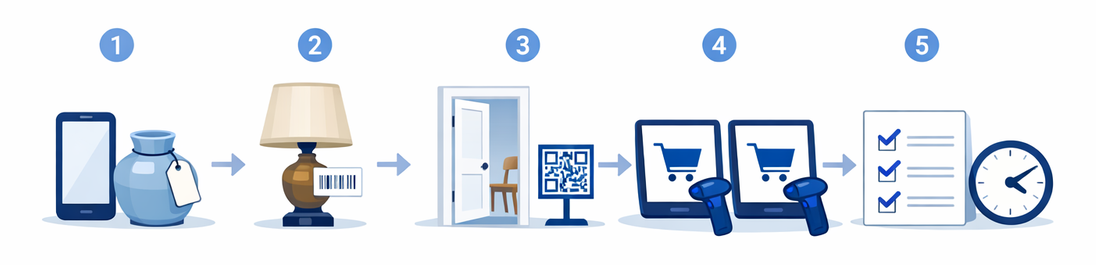
For the full run-of-show, use the estate sale day checklist. New to the category? what is estate sale software maps inventory → labels → check-in → checkout → settlements.
When to keep the spreadsheet (for now)
Stay on sheets (or hybrid) if you’re honestly in this zone:
- Very small estates, one register, trusted crew
- Mostly lot pricing with almost no unique SKUs
- A transitional sale while you train the team
- You’re still validating the business, not scaling houses week after week
The trap is scaling the spreadsheet ritual into multi-register, client-packet sales and wondering why the day after the sale feels like a second job. The tool didn’t fail. The job changed.
How to evaluate the jump (operator questions)
Skip the marketing slide deck. Ask:
- Does it run on the floor? Phones/tablets day-of; web for office bulk work.
- Can you override prices fast? Suggestions without override = fights at the register.
- Is hardware cheap and clear? B1-class label printer (~$30) + a basic scanner; Square / Tap to Pay paths you already trust. Must be the B1, not a B21.
- Do settlements look walkthrough-ready? If the packet wouldn’t impress a family, keep looking.
- Is hybrid honest? EstateSales.net push and pickup windows matter; don’t buy a shipping fantasy.
Product map when you’re ready: features. Category definition: what is estate sale software.
FAQ
Is estate sale software just a fancy spreadsheet?
No. A spreadsheet is a list. Estate sale software is the sale-day stack (inventory, labels, check-in, multi-register checkout, and settlements) so you’re not merging three truths at midnight.
Can I export to a spreadsheet from estate sale software?
Usually yes for office reporting. The win is not “never open Excel again.” It’s “stop running the door and the register from a workbook.”
When does a spreadsheet stop being enough?
When you need multi-register scan speed, real check-in, or same-day itemized client packets. If post-sale reconciliation regularly eats your night, you’ve crossed the line.
Do I have to barcode everything if I switch?
No. Label the money items; lot low-value piles. Barcodes earn their keep at checkout, not as wall-to-wall tagging theater.
Will AI pricing replace my judgment?
No. Good tools suggest; liquidators decide. Override antiques and “family will ask” pieces, then print labels for what you decided.
Soft next step
If you’re still reconciling solds in a spreadsheet after a busy multi-register sale, you’re doing the hard part twice. EstateSail is built for liquidators who want hours back: inventory and AI pricing in prep, NIIMBOT labels on the money items, QR check-in, Square / Tap to Pay checkout that scans, and settlements that don’t invent themselves at midnight.
Your first sale is free. Run the next house on one inventory instead of three tabs, feel what a clean close does to your week, and decide if you miss the midnight merge. After that first real sale, most crews don’t go back.
When you’re mapping the stack, keep what is estate sale software and estate sale day checklist next to features. Category first, then smoother sale days.