

An AI pricing estate sale workflow should help you move from a photo to a reviewed price without giving up control of the decision.
The basic loop is:
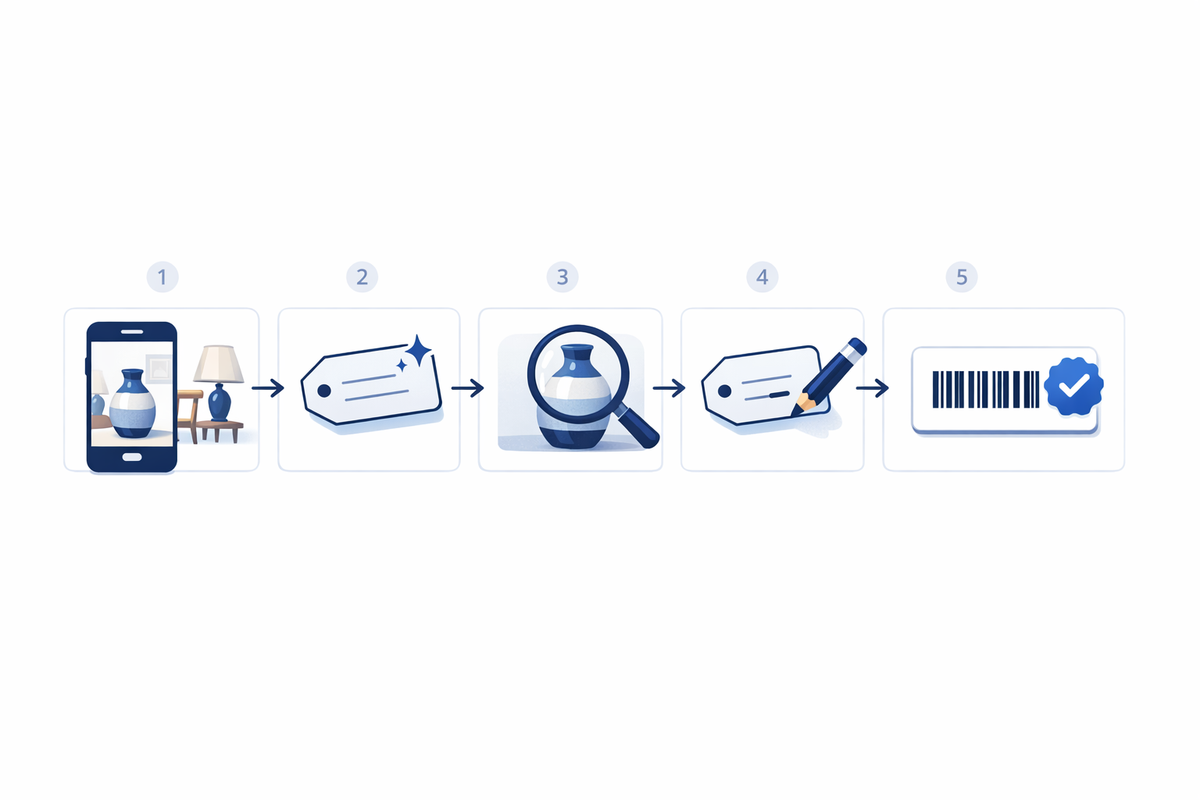
- Photograph one item or upload photos in bulk.
- Receive an editable price suggestion.
- Review the item details and supporting research.
- Override the suggestion when your experience or local market points elsewhere.
- Approve the price and print a barcoded label with title, price, and room.
This is a weekday prep tool, not an automatic appraiser and not a feature reserved for checkout. The useful part is reducing repetitive research while keeping the liquidator responsible for the final price.
This guide explains how to use that suggest, then override loop, when to accept a suggestion, when to change it, and how to fit AI-assisted pricing into a real estate sale operation.

What AI pricing means for an estate sale
AI pricing for estate sales begins with information about the physical item. A crew member takes a photo, selects photos from a room, or adds known details about the piece. The software uses that information to prepare an item record and suggest a price.
The suggestion is a starting point. Sometimes it may also include a range that helps the operator understand the likely pricing area. The central control is still an editable price that the operator can accept or change.
That distinction matters because estate sale pricing depends on more than item recognition. The final price may be affected by:
- Condition and missing parts
- Age, maker, material, or pattern
- Local buyer demand
- The type of property and sale
- How quickly the item needs to move
- Whether the item is common or collectible
- The liquidator’s discount plan
- The quality and relevance of available sold comparisons
AI can organize clues and provide a useful second opinion. The liquidator decides whether those clues support the right asking price.
This pricing step is one part of a larger system. If you are evaluating the full workflow, see what estate sale software does.
The suggest, then override workflow
A reliable AI-assisted process has five practical steps.
1. Take a clear photo
Photograph the entire item in usable light. For pieces with identifying marks, damage, labels, signatures, or model information, take additional detail photos.
Remove unrelated objects from the frame when possible. A crowded image can make it harder to identify which item should be evaluated.
If the item is unusual and you already know something important, add that information before requesting the suggestion. Useful notes might include:
- The maker or artist
- A visible signature
- The material
- Approximate age
- Dimensions
- Working condition
- Missing components
- Information supplied by the family
Known details should guide the research instead of being discarded because a photo has been uploaded.
2. Use single-item or bulk intake
Single-item intake is useful for higher-value pieces, items needing several photos, or objects that require careful notes.
Bulk intake is useful when the crew is moving through a room with many ordinary household items. EstateSail can typically process about 60 photos in one pass, though the practical batch may vary with the items and the crew’s review process.
Bulk does not mean unreviewed. It changes how the photos enter the workflow. Each resulting price still needs human verification.
One practical division of labor is to have staff photograph items while the owner or pricing lead reviews the suggestions before labels are printed. This can help junior staff price like seniors, while preserving the company owner’s pricing standards and final approval.
3. Review the suggested item details
Before focusing on the dollar amount, confirm that the item has been identified correctly.
Check the title, category, description, condition, room, and any important distinguishing details. A price suggestion based on the wrong item type is not useful, even if the number appears reasonable.
Correct the record first. Then review the price.
4. Compare the suggestion with your own knowledge
Ask whether the suggested price fits the item and the sale.
If the piece is familiar and the suggestion falls within your normal pricing practice, accepting it may be reasonable. If the suggestion conflicts with your experience, inspect the reason before proceeding.
EstateSail Price IQ can serve as an in-app second-opinion and comps card. Operators may also use research paths they already know, including eBay Sold results and Google Lens. The purpose is not to collect every price found online. It is to find relevant evidence and decide what applies to the item in front of you.
5. Override when needed, then price and label
Edit the suggested price whenever your judgment supports a different number. The override is a normal part of the process, not an exception or a failure.
Once the title, price, and room are correct, approve the record and print the label. During weekday prep, that produces a barcoded label with title, price, and room that can later be scanned at checkout.
For printer setup and test steps, see the NIIMBOT B1 estate sale setup guide.
When to accept a price suggestion
A suggestion is most useful when the item is recognizable, the photo is clear, and the proposed amount fits your knowledge of the local market.
Examples may include:
- Common furniture styles
- Standard household appliances in known condition
- Widely sold tools
- Everyday decor
- Common kitchen equipment
- Books, media, and household goods with clear identifying details
Even in these categories, review the condition. Two visually similar items can have different values because one is complete, tested, or well preserved while the other needs repair.
You should also consider the purpose of an estate sale price. An online sold result may reflect shipping, a national buyer pool, a long listing period, or a specialized seller. An estate sale asking price must work for the property, local demand, sale schedule, and discount structure.
Accept the suggestion when it fits that operating context. Do not accept it merely because the software produced it.
When to override the suggested price
Override the suggestion when the item has details that the initial result does not fully account for.
Common reasons include:
- The condition is better or worse than expected
- The item is a reproduction rather than an original
- A set is incomplete
- The local market is weaker or stronger than the broader market
- The sold comparison is not truly comparable
- The piece has a verified maker, signature, or provenance
- The family supplied useful information
- The item is likely to sell differently at an in-person sale
- Your company has direct experience with similar pieces
Antiques, art, jewelry, coins, collectibles, and specialized equipment often deserve more review. A photo can begin the research, but subtle marks, construction methods, materials, or condition issues may require expert attention.
For a potentially valuable piece, pause before printing the label. Add better photos and notes, inspect sold comparisons, consult a specialist when appropriate, and then enter the price you are prepared to defend.
How to use sold comparisons and visual search
Research tools are most helpful when they answer a focused question.
Use eBay Sold results to see actual completed transactions rather than current asking prices. Compare the exact maker, size, model, material, condition, and included components. A similar appearance alone does not make two items equivalent.
Use Google Lens to investigate an unfamiliar object, locate possible matches, or identify terms that will improve a more focused search. Treat visual matches as leads, not proof.
Use EstateSail Price IQ as another second opinion inside the item review process. Then apply the same professional questions:
- Is this the same item or only a similar item?
- Is the condition comparable?
- Was the comparison sold or merely offered?
- Does shipping affect the reported value?
- Does the comparison reflect a specialized national market?
- Is that result practical for this property and sale schedule?
The goal is enough research to make a sound decision. One-by-one research on every ordinary household object can become a pricing bottleneck. Reserve deeper research for items where better information could materially change the price.
Decide which items need individual labels
AI-assisted pricing does not mean every minor object needs a unique record and label.
Individually price and label items that benefit from:
- A controlled asking price
- Clear identification
- Separate checkout tracking
- A visible room assignment
- An itemized sold record
- Additional review because of value or risk
Low-value clothing, basic household goods, and similar small items may be handled through grouped lots, posted category pricing, or general checkout entries. The exact threshold should match your company’s procedures.
Selective labeling keeps the crew focused on the money items and the records that matter most. For a broader comparison of manual tools and barcoded workflows, read pricing guns versus barcode labels.
Put AI pricing in the correct part of the week
Inventory and pricing usually happen during weekday prep, often Monday through Wednesday or Thursday.
A practical sequence is:
- Create the sale and rooms.
- Photograph items individually or in bulk.
- Add known details and condition notes.
- Review item identification and price suggestions.
- Research uncertain or higher-value pieces.
- Override prices where needed.
- Print and apply barcoded labels.
- Scan sample labels and verify the records.
- Test checkout before the sale opens.
Sale days should use the work completed during pre-sale setup. The cashier scans the reviewed label, confirms the cart, accepts payment, and preserves the sold record. The register should not become the place where the crew first researches and prices important items.
Learn more about that handoff in the guides to estate sale POS systems and multi-register estate sale checkout. If the crew accepts cards, configure and test the Square-led Tap to Pay on iPhone workflow before sale days.
AI pricing estate sale FAQ
Will AI replace the liquidator’s pricing judgment?
No. AI provides an editable suggestion and supporting context. The liquidator reviews the item, considers condition and local demand, and enters the final price. Human override is a core part of the workflow.
What if the suggested price is wrong?
Correct any inaccurate item details, add known information, review relevant sold comparisons, and override the price. Do not print the label until the title, price, and room are correct.
Should I use AI pricing for antiques?
It can help begin the research, identify possible matches, and provide a second opinion. Antiques with uncertain age, maker, authenticity, or condition may require deeper research or a specialist. The suggestion should not be treated as an appraisal.
Is bulk photo pricing less controlled than single-item pricing?
It does not have to be. Bulk intake lets the crew submit dozens of photos at a time, while the review step still allows the pricing lead to verify and edit each item before labels are printed. Use single-item intake when a piece needs several photos or detailed notes.
Do I need to abandon pricing guns immediately?
No. Start with a defined group of individually tracked items and compare the workflow with your current process. Barcoded labels connect the reviewed price to checkout and reporting, while pricing guns mainly place a visible number on the item.
Keep the operator at the center of pricing
The useful AI pricing loop is straightforward: photo, suggestion, review, override, then price and label during weekday prep.
It can reduce repetitive one-by-one research, give the crew a consistent starting point, and return hours to pre-sale setup. It does not remove the need to inspect the item, understand the local market, or take responsibility for the final price.
If you want to use that workflow on an upcoming estate sale, Your first sale is on me.